

-
没有找到您想要的百科
如何使用Dolphicam2进行复合材料超声波探伤的设置和校准?
如何使用Dolphicam2进行复合材料超声波探伤的设置和校准? How to Set Up and Calibrate Dolphicam2 for Ultrasonic Inspection of Composite Materials? 仪器购买:135-0542-5410 检测服务:186-5324-2346
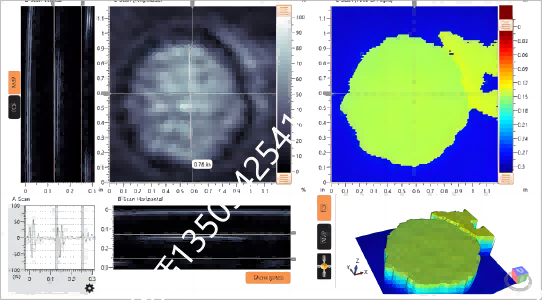
青岛纵横仪器有限公司作为专业的无损检测设备提供商,对于如何使用Dolphicam2进行复合材料超声波探伤的设置和校准有着深入的理解和丰富的实践经验。以下是详细的操作规程: As a professional non-destructive testing equipment provider, Qingdao Zongheng Instrument Co., Ltd. has an in-depth understanding and rich practical experience in setting up and calibrating Dolphicam2 for ultrasonic inspection of composite materials. Here is a detailed procedure: 1. 系统组成和初步设置 Dolphicam2系统包括一个坚固的Pellicase,内含连接的Black Box、Panasonic Toughpad平板电脑、软件以及所有必要的电缆和配件。系统的核心是Black Box,它驱动换能器模块(TRM),同时连接到运行和显示软件的Toughpad。 1. System Components and Initial Setup The Dolphicam2 system includes a rugged Pellicase containing a connected Black Box, Panasonic Toughpad tablet, software, and all necessary cables and accessories. The heart of the system is the Black Box, which drives the Transducer Module (TRM) while connecting to the Toughpad that runs and displays the software. 2. 硬件检查 在开始设置之前,确保所有硬件部件完好无损,包括TRM、Black Box、Toughpad和所有电缆。 2. Hardware Inspection Before starting the setup, ensure that all hardware components are intact, including the TRM, Black Box, Toughpad, and all cables. 3. 系统组装 将TRM通过USB-C电缆连接到Black Box,然后将Black Box连接到Toughpad。确保所有连接都牢固可靠。 3. System Assembly Connect the TRM to the Black Box via a USB-C cable, and then connect the Black Box to the Toughpad. Ensure all connections are secure and reliable. 4. 环境准备 确保测试环境的温度在23 ±2℃,湿度在50±10%,以符合ISO 14126-2023标准的要求。 4. Environmental Preparation Ensure the testing environment's temperature is within 23 ±2℃ and humidity is within 50±10% to meet the requirements of the ISO 14126-2023 standard. 5. 软件设置 启动Toughpad上的Dolphicam2软件,设置语言和单位(通常是公制单位)。软件界面应显示清晰的菜单,包括设置、测量、视图和报告等选项。 5. Software Setup Start the Dolphicam2 software on the Toughpad, set the language and units (usually metric units). The software interface should display a clear menu, including options for settings, measurements, views, and reports. 6. 换能器校准 在进行复合材料超声波探伤之前,必须校准换能器。Dolphicam2提供了内置的校准功能,可以通过以下步骤进行: 6.1. 选择适当的换能器模块(TRM),根据被测材料的类型和厚度选择合适的频率。 6.2. 在软件中选择“校准”功能,按照屏幕上的指示进行操作。 6.3. 将TRM放置在已知材料特性的校准块上,例如具有已知厚度和声速的材料。 6.4. 软件将自动执行校准过程,调整声速、增益和其他参数,以确保测量的准确性。 6. Transducer Calibration Before performing ultrasonic inspection of composite materials, the transducer must be calibrated. Dolphicam2 offers a built-in calibration function that can be performed through the following steps: 6.1. Select the appropriate TRM based on the type and thickness of the material being tested. 6.2. Choose the "Calibration" function in the software and follow the instructions on the screen. 6.3. Place the TRM on a calibration block with known material properties, such as a material with known thickness and sound speed. 6.4. The software will automatically perform the calibration process, adjusting sound speed, gain, and other parameters to ensure measurement accuracy. 7. 设置测试参数 根据ISO 14126-2023标准和具体的测试要求,设置以下参数: 7.1. 数据采集率:根据TRM的设置,通常为30个完整的数据集(128x128 A-scan)每秒。 7.2. 测量单位、材料深度、门控、材料声速、发射脉冲形状、增益、滤波和平均值等。 7.3. 时间校正增益(TCG)设置为0到10 dB/μs,数字增益设置为+50dB。 7. Setting Test Parameters According to the ISO 14126-2023 standard and specific test requirements, set the following parameters: 7.1. Data acquisition rate: typically 30 full datasets (128x128 A-scans) per second depending on TRM settings. 7.2. Measurement units, material depth, gating, material sound speed, transmit pulse shape, gain, filtering, and averaging. 7.3. Time Corrected Gain (TCG) set to 0 to 10 dB/μs, and digital gain set to +50dB. 8. 测试执行 8.1. 将校准后的TRM放置在复合材料表面上,确保良好的耦合。 8.2. 在软件中启动测试,TRM将发射超声波,并通过接收反射回来的声波来检测材料内部的缺陷。 8.3. 观察A-scan、B-scan和C-scan图像,以及3D视图,以识别材料中的缺陷。 8. Test Execution 8.1. Place the calibrated TRM on the composite material surface, ensuring good coupling. 8.2. Initiate the test in the software, the TRM will emit ultrasonic waves and detect defects within the material by receiving the reflected sound waves. 8.3. Observe A-scan, B-scan, and C-scan images, as well as 3D views, to identify defects within the material. 9. 数据记录和分析 9.1. 记录测试过程中的所有重要数据,包括声速、增益设置、TCG、缺陷位置和大小等。 9.2. 使用软件中的测量工具,如深度B-scan、C-scan中的线、C-scan中的深度和振幅、矩形和圆形测量工具,来量化缺陷。 9.3. 分析统计数据,如平均值、标准偏差、中位数和众数,以评估材料的整体状况。 9. Data Recording and Analysis 9.1. Record all important data during the testing process, including sound speed, gain settings, TCG, defect location, and size. 9.2. Use the measurement tools in the software, such as depth B-scan, line in C-scan, depth & amplitude in C-scan, rectangle, and circle measurement tools, to quantify defects. 9.3. Analyze statistical data, such as mean, standard deviation, median, and mode, to assess the overall condition of the material. 10. 报告生成 10.1. 使用软件中的报告配置功能,生成包含所有测试数据、图像和分析结果的报告。 10.2. 确保报告符合ISO 14126-2023标准的要求,并包含所有必要的信息,以便其他专业人员可以理解和验证测试结果。 10. Report Generation 10.1. Use the report configuration function in the software to generate a report that includes all test data, images, and analysis results. 10.2. Ensure the report complies with the ISO 14126-2023 standard and contains all necessary information for other professionals to understand and verify the test results. 11. 系统维护 11.1. 测试完成后,关闭软件并断开所有连接。 11.2. 清洁TRM和其他硬件部件,确保没有残留的耦合剂或其他污染物。 11.3. 将所有部件放回Pellicase中,并妥善存放,以备下次使用。 11. System Maintenance 11.1. After the test is completed, close the software and disconnect all connections. 11.2. Clean the TRM and other hardware components to ensure there is no residual coupling agent or other contaminants. 11.3. Return all components to the Pellicase and store them properly for future use. 通过遵循上述步骤,青岛纵横仪器有限公司确保Dolphicam2在复合材料超声波探伤中的设置和校准过程既准确又高效。这不仅提高了检测的可靠性,还确保了测试结果的一致性和可重复性。 By following the above steps, Qingdao Zongheng Instrument Co., Ltd. ensures that the setup and calibration process of Dolphicam2 in composite material ultrasonic inspection is both accurate and efficient. This not only improves the reliability of the inspection but also ensures the consistency and repeatability of the test results. |